New Post

Rss

Saturday, December 28, 2013
no image

8 Brilliant Mobile Development Tools!


Coding mobile apps becomes faster and easier with these revolutionary tools and cloud services.   
From a Flash genious to a perfecto mobile app developer, this transformation might be a little hectic. The good news is that there is some help available for you. There are some tools and frameworks to help you in the journey. Here's a collection of 10 tools that wont need you to learn the complexities of Objective-C (iPhone) or Java (Android, BlackBerry) because the frameworks are simpler to understand.

Mobile Development, framework for mobile app development, mobile app development, developer,tools for mobile development, mobile developer, mobile programmer, tools for mobile programmer

1. Firebase

Data is the lifeblood of any app, and with Firebase, storing and sharing all that info is easier than ever. You set up your project, and Firebase handles all the hassles of setting up a key-value store. It offers tools so that you can build the apps juggling the data. It's especially tuned to push changes among the other users of your app, so collaboration is simpler. It's the back end that lets you concentrate on the front end.

2. AppGyver

AppGyver makes a number of tools for mobile app development, including a PhoneGap extension called Steroids. Prototyper may be the most eye-opening, though, because it lets you glue together a few pages into a flexible prototype for testing your ideas. It will deploy the result to your device through a QR code or let you test the prototype on the AppGyver website.

3. Intel XDK
no image

These Storage Disks Can Store Data For A Million Years Atleast!


A storage disk made from Tungsten can stand natural calamities, thereby retaining data for over a million years. Here’s taking a look.   

Innovation knows no bounds. The world of digital storage is changing and evolving with every passing day. The problem with magnetic disk storage system that was introduced by IBM in 1956 is that it cannot retain data for more than a couple of years. Many storage devices can keep data for slightly over 10 years.

Disk storage, IBM, Data, Storage devices, Problems, Researchers, Media, Exposed, QR codes, Temperatures, Tungsten


As stated on crazyengineers.com, Jeroen De Vries from University of Twente (Netherlands) has come up with a solution for solving this problem. De Vries along with co-researchers have created a storage disk that can keep data for nothing less than a million years.

The team uses tungsten that has a high melting temperature (about 3422 degree Celsius) with a lower thermal expansion coefficient with a protective layer that is made from Silicon Nitride (Si3N4). The recording of data by the team was done in the form of QR codes having 100nm wide lines on the media.

It was then exposed to different temperatures for viewing how the medium retained the data. The team also conducted accelerated aging tests and discovered that the medium could store data for a long time, for over a million years without any problems. De Vries and his team feel confident that they can construct much better and stronger storage media that can withstand house fires, floods or even a meteor strike.
no image

Top 8 Countries With World's Fastest Internet!

 
Want to know where can you find the fastest Internet connections of the world? Here's the list!   
Monday, November 04, 2013 We know how many of you are struggling to find the perfect Internet connection with a good speed. Well, it’s altogether a different story in many countries where the internet is blazing fast on a normal speed as well. Here is the list of countries with the fastest internet connections based on Akamai’s State Of The Internet report.

fastest internet, fast internet, countries with fastest internet, internet speed, top countries with fastest internet speed


1. Hong Kong – 65.1Mbps

Maintaining its position as the country with the fastest internet, Hong Kong is still the no. 1 on the list with peak speed of 65.1Mbps. Although this is 0.9 per cent fall as compared to past quarter, but it is a 32 per cent growth as compared to last year.

2. South Korea – 53.5Mbps

South Korea gains two spots to secure the No. 2 spot this time with its peak internet speed of 53.3Mbps. The speed shows a growth of 19 per cent over the past quarter and 14 per cent over last year.
Thursday, December 26, 2013
How To Install OS From Pen Drive? Create Bootable USB Drive

How To Install OS From Pen Drive? Create Bootable USB Drive

     If we need to install a new Operating System to  a PC, we  must  have  the  OS  in  CD  or DVD.    If  we  buy  a  new  Windows  or  Linux  OS,   it  will be available in CD or DVD only. By

groldz.com-power ISO
   Figure 1
bought that only we can install and use that OS in our computer.  But, it’s a complex task if the following causes held.
  • If the Pc doesn’t have CD/DVD dive.
  • If the CD/DVD drive doesn’t works properly.
  • If the OS CD which you have is broken or damaged.
How To Download YouTube Video Easily Without Go For Any Website?

How To Download YouTube Video Easily Without Go For Any Website?

Social networking is very mush essential  for us in our day to day life. Most percentage of internet  resource   in   the   world   is being  used  for  visiting  social  networking sites likes

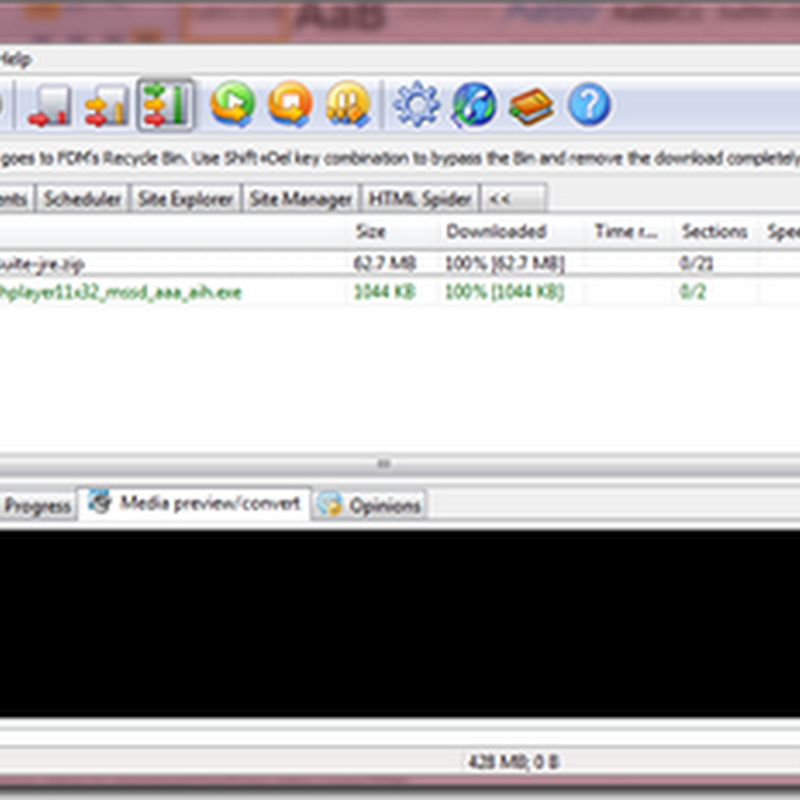
www.groldz.com fdm
Facebook, twitter, YouTube, Google plus etc.
     Among these sites YouTube is very essential which is used to watch, share and upload videos. YouTube is the biggest video sharing site which is using world wide today. All the entertainment and official videos are being get uploaded in YouTube daily. Among those videos, we can watch and share any of the video. But, there is no “Download” option in YouTube. They wont allow the users to download the videos.
How To Easily Change Windows 7 Password Without Knowing Old Password? A Simple Hacking Trick Using Local User Manager

How To Easily Change Windows 7 Password Without Knowing Old Password? A Simple Hacking Trick Using Local User Manager

     Many of us searched and searching for this trick.  Some times, we need to change the password  of  a system  without  knowing  its  current password.  In that case, if that  system

has Windows 7 OS, its very easy to change the password. We can easily done that without any complex commands and steps. Just read this article, it will surely help you.
     For that if we go for “User Accounts'”, there its will ask for the current password too. So, if you want to change the password of an logged in Windows 7 system without knowing its current password, or want to play with your friend by changing the password of his system, just read more.

NOTE: The Windows should be logged  in as admin to perform this operation.
 
     Just follow the simple steps.
  1. Just open the Run box by press Win Key + R.
  2. Type “lusrmgr.msc” as shown in figure 1. (without double quotes")
  3. The “Local Users and Groups” window will be open as shown in figure 2.
  4. Double click on “Users” folder. All the system user accounts will be showed as shown in figure 2.
  5. Right click on the account name which you want to change the password and select“set password”.
  6. A warning will be shown as shown in the figure 2.
  7. Click on “Proceed”.
How To Download Large Torrents Easily Without Torrent Client & Uploading? Save Your Bandwidth

How To Download Large Torrents Easily Without Torrent Client & Uploading? Save Your Bandwidth

     Now a days torrents are playing important role in all our downloads. If you want to download any new movies, piracy soft wares and many other stuffs, just go to torrents sites.

   www.groldz.com-zbigz
     Torrent is the powerful technique for large downloads. We must need a torrent client tool to download torrents. But if you are downloading a torrent file, you need to upload the same file parallel at the time u downloading. It is must to upload but it will take our bandwidth. Most of us didn’t want to upload the file and waste the bandwidth.
     Here is the simple trick to download the torrent files directly with resume support. There is a site called zbigz which is act as an online bit torrent client. It will help us to download the torrent files without a torrent client tool.
To go for zbigz <<<CLICK HERE>>>
     Go to the site, then paste the torrent link in the required bar. Then click the GO button. The site will retrieve the file and upload the whole file into it’s server
no image

10 Tips for Troubleshooting Your PC


You've had a couple of issues with your computer lately, and don't know what to do next. It's gotten to the point that it's annoying, but you're loathe to spend the time and expense of having a tech guy come and fix the problem. Try these quick fixes for some common problems before installing that "fixmyPC" program from the Internet or carting your system down to the repair depot. At the very least you'll eliminate a few frustrations in your digital life, and that's a good thing, right?10 Tips for Troubleshooting Your PC
There's a whole bunch of icons on my desktop, and I don't know what to do with them.
Simple: Remove the crap and bloatware from your PC. Trust me on this. You don't need every program that comes with your PC, particularly if you bought it from a big box store. While any program you use should be kept, there are likely a half dozen more that you don't need. If there are three ebook readers on your PC, uninstall the two you don't need. Likewise, remove the video streaming services you don't use and games you don't play. At the very least, these programs are taking up space on your hard drive; at worst they will slow your system down when they look for updates.
no image

How To Fix a Computer That Won't Turn On

               What To Do When Your Computer Won't Start

It's a dreadful way to start a day - you press the power button on your computer and nothing happens. Few computer problems are more frustrating than when your computer won't boot.
There are many reasons why a computer won't turn on and often very few clues about what might be the problem. The only symptom is usually the simple fact that "nothing works" which isn't much to go on.
Add to this the fact that whatever is wrong could be an expensive part of your PC to replace - like the motherboard or CPU.
Do not fear because all may not be lost! Here's what you need to do:
  1. Read #1 below (it'll make you feel better).
  2. Pick the best troubleshooting guide (#2 - #9) based on how your computer is acting or #10 if your PC stops at any point because of an error message.
Note: All of these "computer won't start" troubleshooting guides apply no matter what Windows operating system you have installed on your hard drive, including Windows 8,Windows 7Windows Vista, and Windows XP. Steps 1 through 5 even apply to other PC operating systems like Linux.

1. Don't Panic! Your Files are Probably OK

Files and Folders - Your Files are Probably OK
When faced with a computer that won't start most people tend to panic, worried that all the data on their PC is gone forever.
It's true that the most common reason a computer won't start is because a piece of hardware has failed or is causing a problem but that hardware isn't usually a hard drive, the part of your computer that stores all of your files.
In other words, your music, documents, emails, and videos are probablysafe - just not accessible at the moment.
So take a deep breath and try to relax. There's a good chance you can figure out exactly why your computer won't start and then get it back up and running.
Tuesday, December 24, 2013
no image

Basic Troubleshooting Techniques

The computer goes blank before the Word document was saved. The browser window freezes for no reason. You can't hear anything from your speakers.
Most people have at one time or another experienced a computer problem like the situations just described, and if you haven't, chances are you will at some point. When a problem occurs, don't panic! Instead, work your way through some basic troubleshooting techniques and try to solve the problem.

General Tips to Keep in Mind

Cables plugged into the back of a computerCables plugged into the back of a computer
There are many devices, parts, cords, and connections on a computer, which means that there are many possible problems that could arise. In addition, your computer uses a variety of software, which can also cause problems. However, no matter what the problem is, you can use the following tips to help you find a solution:
no image

15 Awesome, Useful Internet Tricks

1. For clumsy fingered folks, if you accidentally close a tab on Google Chrome, press Control+Shift+T and it’ll come back from the dead.

2. If you’re in a particular country that can’t access important content on US websites like Hulu or Netflix, Firefox and Google Chrome offer a free extension called Media Hint that can have you watching Orange is the New Black and other American exclusives in no time.

3. Control+F or Command+F will allow you to find specific terms on a page. If only life had a version of this for when we lose our keys, phone, dignity, etc.

4. Want to surf the web in private with no recording of your web habits? For Firefox users, press control+shift+p, or for Chrome it’s control+shift+N, and you’ll be browsing off the record. This isn’t just for porn watching purposes as one might think, but for several other benefits such as websites that track your cookies and use ‘em to their advantage (I’m looking at you, hotel & airline companies). This simple incognito window defeats their swindling ways.

5. If you hate YouTube’s (or other website’s) ads before the start of your videos, Adblock Plus is what you need in your life. It’s basicallylike having Dikembe Mutombo protecting your eyes from any type of advertisement.
no image

How do I remove computer memory in my computer?


If memory is already installed in your computer memory slots, some or all of it will need to be removed before additional memory can be added. Below are the steps on how to remove memory from your computer.

If the computer is not already opened, open the computer and locate the memory in the memory slots you want to remove.

If all your memory slots are occupied and you're not sure what memory to remove, use a third-party tool such as the online Crucial Memory scanner to display your memory information. In the picture to the right, is an example of what the results of this memory scanner may show. As can be seen in the picture, the example computer has 8GB of memory with 2GB memory cards in each of the available slots. If you wanted to upgrade this to a total of 16GB of memory, you would remove all 2GB memory sticks and replace them with 4GB memory modules.
no image

How do I remove computer memory in my computer?


If memory is already installed in your computer memory slots, some or all of it will need to be removed before additional memory can be added. Below are the steps on how to remove memory from your computer.

If the computer is not already opened, open the computer and locate the memory in the memory slots you want to remove.

If all your memory slots are occupied and you're not sure what memory to remove, use a third-party tool such as the online Crucial Memory scanner to display your memory information. In the picture to the right, is an example of what the results of this memory scanner may show. As can be seen in the picture, the example computer has 8GB of memory with 2GB memory cards in each of the available slots. If you wanted to upgrade this to a total of 16GB of memory, you would remove all 2GB memory sticks and replace them with 4GB memory modules.
Monday, December 23, 2013
Computer (PC) Tricks You Should Try Right Now

Computer (PC) Tricks You Should Try Right Now


 Obviously not! Here are some of the best tricks you can try out on your Windows based computer.

Computer Tricks
1) Make your computer speak what you type
You can use your PC's built in features and some VBScript magic to create a simple program that will make your computer speak whatever you input to it. What are you waiting for? Head over to this post to start a conversation.

2) Find your computer's gender
Want to know if your PC is a male or a female? Simple. Try the previous trick to know if your computer is a 'he' or a 'she'.

On a serious note, this depends upon the voice you have selected in Microsoft Text to Speech options.

3) Lock Folders with password
Do you often have other people seeing your personal files? You can store them in a password protected folder so that only you can access them. Go see this post to know how to protect your personal files effectively.
no image

About Download Free Software For PC


 Several software package which can be found totally free is really open-source software package. Altering extra software package is generally in the problems related to assistance an individual take if you buy as well as acquire this particular. Anytime getting software package, an individual preserve the amount of time period it takes to operate a vehicle with a software package store and you also preserve the region it takes to be able to store the item if you have this home. Many individuals uncover this is often a useful solution to purchase software package. Just about everybody offers generally employed simply incredible software package on the actual personal computers. Our children are now educated to utilize this particular, nonetheless they are usually partially as well as completely unacquainted along with free software package as well as the benefits it provides.

Instruction making use of personal computers needs to be totally free. This particular really should not be an opportunity regarding businesses to ensure their very own software package monopoly. Free software package does not suggest simply no cost software package. It is precise that lots of existing open provide duties are around for without charge, leading ambiguity around the well-liked expression free software package.
no image

Troubleshoot Internet connection problems


Troubleshooting Internet connection problems can be a challenge because there are so many possible causes. First, try these steps:

Open Network Diagnostics by right-clicking the network icon in the notification area, and then clicking Diagnose and repair.

Make sure that all wires are connected (for example, make sure your modem is connected to a working phone jack or cable connection, either directly or through a router).

Reset your modem and router. Remove the power cord from the modem and/or router, wait at least 10 seconds, and then plug the modem and/or router back in.

Check your router. Because of the new networking features in Windows Vista, some older network routers are not fully compatible with Windows Vista and can cause problems.
If these steps don't solve the problem, look for a specific problem in the following list.
Saturday, December 21, 2013
no image

6 Tips for Keeping Your Android Smartphone Working at Peak Performance


6 Tips for Keeping Your Android Smartphone Working at Peak PerformanceMany different manufacturers release smartphones loaded with Android OS systems. The Android OS is available for free under the Apache license. The OS makes it easy for users to make calls, text, take photos, watch video, and surf the web. Downloading a lot of data to the Android smartphone means it will slow down over time. The battery can affect the phone’s performance when it gets old and loses its charge, and needs to be replaced. Users can preserve their phone batteries by taking good care of them and avoiding exposure to extreme temperatures. To improve overall performance, users are encouraged to delete unwanted software and media, close background programs, use memory management software, and also use the factory reset to remove all saved data from the phone. Smartphone retailers, name brand websites, and auction sites like eBay are all places users can find these phones.
no image

10 Tips to Conserve Your Smartphone Battery

Apple, BlackBerry, Samsung and other global brands have come up with smartphones equipped with powerful mobile operating systems such as Google’s Android, Nokia’s Symbian, Apple’s iOS, etc, that allows users to play games, listen to mp3s, snap pictures, have access to the Net and even stream videos.
Given their diverse range of capabilities and multi-functionality running on a mobile (as in on-the-go) platform, it’s no wonder that battery life has always been a concern for developers, manufacturers and the users themselves. On average, most smartphone batteries last between one and two days before being completely depleted, and in need of a recharge.
Increase Battery Life

(Image Source: Dokisoft)
While we wait for the hardware development to catch up, the alternative will be to conserve battery life. As it is with our energy levels, battery life can be effectively utilized and managed, leaving nothing to go to waste. Without a battery charger or a spare battery with you everywhere you go, you’ll have to make due with minimizing the consumption of battery juice.
Here are 10 essential tips how you can conserve your smartphone’s battery.
no image

Ten steps for removing write protection from USB

You should remove it as below:
1 Pull the USB flash drive out of your computer's USB port. Check the bottom end and sides of the drive to see if it has a write protection switch. Push the plastic switch into the "Unlock" position.
2 Insert the USB flash drive back into the USB port. Close the pop-up window that appears and navigate to the Start menu. Select "My Computer."
3 Locate the drive letter that corresponds to your USB flash drive in the "My Computer" window, such as "F:\" or "D:\." Double-click the drive letter. Attempt to use one of the files on the drive. Right-click one of the files if you still receive a write protection error and select "Properties."
4 Navigate to the "General" tab and remove the check mark from the box labeled "Read-Only." Click "Apply" and then attempt to use the file.
5 Return to the Start menu and click "Run." Type "Regedit" and press "Enter." Navigate to the registry folder "HKEY_LOCAL_MACHINE\SYSTEM\CurrentControlSet\Control\StorageDevicePolicies."
6 Check if there is an entry at the right side of the window labeled "Write Protect". If the entry is not there Right-click inside the window and choose "New D Word." Type "Write Protect" and press "Enter."
7 Double-click the "Write Protect" entry. Check that the value listed in the text box is "0." If it is not, delete the value and replace it with "0."
8 Close the registry editor and attempt to use any of the files on the USB drive. Return to the "My Computer" window if you continue to receive a write protection error message.
9 Right-click the drive letter for the USB flash drive and choose "Format." Click the drop-down menu named "File System" and select "Fat32."
10 Click "Start" to format the USB flash drive and remove the write-protection feature.
Friday, December 20, 2013
no image

10 valuable tips and tricks on smartphone photography

10 valuable tips and tricks on smartphone photography
Isn't it amazing how much smartphone cameras have evolved over the past years? As we're already convinced having tested dozens of them, most high-end handsets can easily match the performance of a basic point-and-shoot unit. This helps to explain why more and more people don't bother carrying a dedicated camera with them anymore and just use their phones instead. However, while smartphone cameras are, in general, simple and straightforward to use, not all people know how to make the most of them. And what's really disturbing, some smartphones are, by default, set to not use the full potential of their cameras. That's why we decided to write this post and give novice users a few helpful tips on smartphone photography.


5 Ways to Create Online Quiz

5 Ways to Create Online Quiz

Online quiz becomes more and more prevalent in the web 2.0 era. For bloggers or webmasters, quiz is an outstanding way for engaging readers and growing blog or Web site traffic. For trainers, online quiz is a good e-assessment authoring tool. For business men, an online quiz can also be used as a sales tool. Here are 5 ways to create quiz for online use.
1. Create quiz with desktop Flash quiz maker
Some Flash quiz makers supply an easy way to create professional Flash quiz in minutes. With them, you could create Flash-based quizzes with images, sounds, narrations and Flash animations with up to 10 question types. You also could set feedback to each questions and randomize questions and answers. Some quiz maker also supply free quiz result tracking system, like QuizCreator. Users could track all the quiz results with email or free Quiz Management System. You could view the quiz below which is created by QuizCreator.
Thursday, December 19, 2013
no image

Should You Buy a Mac or a PC?

Buying a Mac or PC Computer
Deciding whether to buy a Mac or a PC should be based on two main points: your budget and whether the computer is primarily for business or pleasure. Both types of computers are excellent for specific tasks, although if you are planning to go to work and bring your computer with you, you may need to consider what types of computers your coworkers will have to make it easier to swap files or compare notes. Here a few basic tips on how to choose the right computer for you.

Budget

There’s no debate—Macs are far more expensive than PCs. If money is a big issue for you, you’ll want to buy a PC. However, Macs aren’t overpriced. Unlike PCs, each computer is designed for maximum efficiency in both processing speed and ease of use. While PCs frequently crash and are vulnerable to spyware and viruses, Macs resist most viral attacks and operate at a consistently high standard with virtually no technical issues. If you can afford it, a Mac is an excellent investment which will work for you for years.

no image

How to Protect Your Computer From Viruses


computer security virus tips
With millions of computer users browsing the web at any given time, there are plenty of targets for malicious coders. While computer experts don’t always know why coders choose to build harmful computer programs, the fact is that it happens all the time. Computer viruses can steal personal information, interfere with normal operations, attract spam and even shut down your computer’s hard drive. Protecting your computer is critical for browsing success.

Start With the Basics

Tuesday, December 17, 2013
no image

How to Use Google for Hacking

Google serves almost 80 percent of all the search queries on the Internet, proving itself as the most popular search engine. However, Google makes it possible to reach not only the publicly available information resources, but also gives access to some of the most confidential information that should never have been revealed.
In this post, you will find the information on how to use Google for exploiting security vulnerabilities that exists within many websites. The following are some of the ways to use Google for hacking:

1. Using Google to Hack Security Cameras:

There exists many security cameras that are used for monitoring places like parking lots, college campus, road traffic etc. With Google, it is possible to hack these cameras so that you can view the images captured by them in real time. For this, all you have to do is just use the following search query in Google. Type in the Google search box exactly as given below and hit enter:
inurl:”viewerframe?mode=motion”
Click on any of the search results (Top 5 recommended) and you will gain access to the live camera which has full controls. You will see something as follows:
Hacking Live Camera
As you can see in the above screenshot, you now have access to the Live cameras which work in real-time. You can also move the cameras in all the four directions, perform actions such as zoom in and zoom out. This camera has really a les
How To Add Categories Section To Blogger Blog

How To Add Categories Section To Blogger Blog

Blogger Blog does not support categories but has only comes with labels, In this tutorial  i will show you how to manually create categories in Blogger blog. Category is a very important section of any blog or website, because with the help of categories people can easily find what they are looking for. Now we would manually create category section in blogger from labels, This tutorial is aimed at beginner bloggers, Let me explain how to add category section in blogger blog.

How To Create Categories Section To Blogger Blog
The first and easiest way to create categories section in Blogger is to rename the section of labels widget as categories. Of-course this is not the appropriate solution for a blog in which there are huge number of labels. An easy way round this problem is create a separate categories section.
  • Adding categories section to a Blogger blog involves following steps :
1. First of all you have to decide how you want to group your articles, according to the labels applied, and what group heading you want to give to each grouping of articles.

2. Navigate individual page of the label for first category which you want to use by clicking on the label in side bar. Copy URL address of this page. For example the URL address of the label of Blogger Widget on my site is :
http://things-guide.blogspot.in/search/label/Blogger%20Widget

3. Now go to Dashboard > Layout > Add a Gadget > Link List
5. Enter "Categories" as the title

6. In the Configure Link List dialog box, paste the link of the label you've copied from the address bar to  Site URL
Link List Widget blogger blog
7. Enter the name of your Category
7. Click on Add Link to add the link to your new categories list.
8. For every label you wish to put into the Categories Section copy the link and add it to the Configure Links List. By the end you will end up with two or more categories in your list
9. Use the arrow keys to each link to move them according to your choice where you want to place them.
  • Limit the number of posts :
You can also Limit the Number of Posts Displayed in the Categories Section. For this you will need to adjust the URL's of each label as follows :
From :
http://yoursite.blogspot.com/search/label/CategoryName
To :
http://yoursite.blogspot.com/search/label/CategoryName?max-results=max number of posts to display
Change the value of max results to number of posts you want to display, for example max-results=20

I hope this Tutorial of manually adding categories using the Link List widget into blogger blog would of great importance to you.
How to Remove or Customize Blogger Attribution Widget

How to Remove or Customize Blogger Attribution Widget

If you are using a template by Blogger Template Designer, All of them have an attribution at the bottom of the blog. by default, Blogger templates include attribution gadget at the bottom of each template. The Attribution gadget is the gadget in the footer that says "Powered By Blogger". If you have tried to remove this then you may noticed that gadget is locked and you are able to modify only the "Copyright" statement from the widget.
Remove blogger footer attribution

Most of  the blogger dislike it and ask are they allowed to remove this from their template? The answer is yes you are allowed! Follow my instructions below if you wish to remove or customize blogger attribution widget.
Monday, December 16, 2013
Qualities To Become a Successful Blogger

Qualities To Become a Successful Blogger

The qualities of a blogger should be attended at all times in order to become someone popular, a blogger should have plenty of ideas for creative writing, along with a truckload of motivation. The results sought will not come overnight, there's no guarantee. What you need first are two things in order realize your dream of running a successful blog: a lot of exclusive content and reader loyalty. In each case, time will be needed to develop the success, this is a process and not a short-term event.

qualities of a blogger

Here are three qualities of a blogger who, as a site administrator will need to provide, if his goal is to manage a successful blog.

Patience


A successful blog is a product of time and effort and as a site administrator, you will need patience. As previously mentioned the results will not arrive rapidly overnight, therefore, it is important to realize this from the start. If you are constantly trying to develop new and creative ideas for writing on your blog and at the same time you are worried if you will see any results, this will only make things more difficult. The building of a blogging platform is a "long term" effort, therefore, you must decide whether to accept the challenge or not. This is the main qualities of a blogger.

Credibility


Much of the traffic of any successful blog is based on publishing unique content and its credibility. In fact, the quality of what is in the site will have a direct impact on what will become viral visitors coming to your platform. If it's worth people will talk about your blog, and if they do, others will come to see what you have. Depends on you to publish useful and accurate information, your readers will do the rest.

Consistency


Maintaining a steady stream of creative writing ideas is vital to be able to constantly update the blog. The frequency of publication to a proper schedule is related to the measure of the amount of time you have available and your level of motivation. However, it is important to establish a sort of consistency so that people can schedule their own visits accordingly. Just remember that the more often you write, the more people will visit, so their loyalty will grow faster and their referrals will be extended.

For becoming a popular blogger is important having a healthy source of creative writing ideas, along with a lot of patience and motivation. Ultimately, it will be reduced to you as the system administrator to provide the three qualities of a blogger we discussed above, who is searching tirelessly his goal of having a successful blog. In the end, your own motivation and patience will be the glue with which all the elements will be put together for your dream to come true.
no image

Adding Label On Blogger

If your blog covers a lot of different topics, Blogger lets you easily categorize your blog posts through the Labels feature. Labels are subjects or categories that you use to organize your posts. For example, you may list food, art, fashion as labels in your blog. This feature is advantageous if you write about different topics. In this way, readers can easily find your posts by category. Moreover, if you have your own blog team, you may categorize each member with their own level to make it easier for readers to find their posts.
Adding label/s on your Blogger post is easy. Just follow these steps.

Steps:

  1. On your Post Editor, look for Post Settings tab.
  2. Click Post Settings. A dropdown menu will appear.
  3. Choose Labels from the dropdown menu.
Add jQuery LIGHTBOX Popup Facebook Likebox To Blogger NEW

Add jQuery LIGHTBOX Popup Facebook Likebox To Blogger NEW


Add jQuery LIGHTBOX Popup Facebook Likebox
I had given to Facebook as jQuery popup box and jQuery to facebook emerging as the box with the background image in my previous post, if you are new here, that the first visit, now I'm back with the same widget, just change the background image and the size of this widget. I just tried this and I hope you enjoyed it.

How To Add A Awesome Facebook Fan Page JavaScript For Blogger
Add Static Facebook Pop Out Like Box with Smooth JQuery Hover

Add Static Facebook Pop Out Like Box with Smooth JQuery Hover

Facebook Pop Out Like Box


Hello friends, here's another Facebook jquery pop up for facebook like box widget for bloggers (or) website. Advantages this widget is to free space on the page. Because Facebook can prevent website normal as the box. Static Pop Out Facebook as soft box with jQuery effect of activation for the blogger, this is another cool control. Here I have added as the box with simple jQuery hover effect. See Facebook static plate to the right of the page and move the mouse over the plate with the frame, as is visible by sliding to the left.


Add Left Side Static Facebook Pop Out Like Box with Jquery Hover Effect

Step 1: Adding Static Facebook Pop Out Like Box Widget To Blogger layout.

Now let's start adding it...
Top 9 Ways Of Earning Money Online In 2012!

Top 9 Ways Of Earning Money Online In 2012!

Make Money Online Tips In a world such as today’s, where inflation is on the rise while salaries remain the same, every extra penny can be a blessing. Self-dependence is considered as the ideal situation to be in, especially among the younger generation. Because of the ever rising cost of living commodities and luxuries, more and more people are finding themselves working over-time for some extra salary, looking for better jobs, working part-time to cover their expenses, and so on. Hence, people want to look for alternate or parallel sources of income. And as they say, "where there’s a will, there’s a way". Indeed, there is not one, but many ways you can earn a few extra bucks. Many of these involve working online, meaning you can increase your income while working in the comfort of your living room!
Most of my blogger friends would know how they can earn money online through their blogs via monetizing them. But not everyone has a blog, even though creating a blog is as easy as creating a Facebook profile. Maintaining a blog, however, is not as easy. Hence, for such people, there are various other ways through which they could earn an income.


Freelancing

I hope you most of you know what freelancing is. It is basically working for someone else online and getting paid for it. By far, this has proven to be the most popular and most paying alternative to a regular office job. And in many ways, freelancing is better than regular jobs. Firstly, you get to do the work that you choose, so that you have some interest in it. Secondly, there's a wide range of stuff you can do. You can write articles, translate papers, do programming assignments for somebody, or take up large corporate projects as a team. The upside to this is that, you earn good bucks. The downside is, yo have to abide by deadlines.

Freelancing

Freelancing is great. It's your own way of saying out to the world; hey! I am independent! I don't need a job! I have a life too! Although technically, you do have a job. But at this job, you can take a nap at anytime and do whatever you want, so long as you do your work.

If you want to look into this, you can try 5 Ways To Win A Job As A Freelancer For Beginner. Or take a look at the Top 10 Freelancing Tips.

Online Surveys

Online surveysThere are many websites out there that are looking for people who would help them in their research and fill out surveys for them. Their aim is to get feedback and do market research on a product. There are website that are dedicated to finding out surveys available for you. One good example is SurveyScout.

Write Articles

Freelance writing is another great way of earning online. If you like writing, or if you are good at it, then you should consider this. Writing quality articles can earn you thousands of dollars per month. All you need to have is the right focus and of course, a good publishing platform where you can submit your articles.


As far as publishing is concerned, you can either self-publish, or submit your article to an article directory. You can either create a blog for self-publishing, or use Squidoo or Hubpages. Click to learn more about earning money through Squidoo.

If you don't want to self-publish, you can submit your articles to the top sites that will pay you for them. This is one of the best ways of earning online. Be sure never to plagiarize, however. Unique content is appreciated, while plagiarism might result in a ban on you. So be original, and you will be fine.

Data Entry

Data Entry is another popular money earning technique used by many people. But I must admit, it is a boring and time-intensive work. There are a lot of companies that want you to do their laborious tasks for them, without hiring a professional for the job. Usually, these tasks are simple. Entering one form of data into a form, organizing data, removing mistakes and errors, and so on.

Surfing and searching

Did you know that you can get paid to search on the internet? No kidding! Since the major search engines such as Google, Yahoo, Bing etc are monopolizing the industry, other smaller engines are left out. So to keep themselves going, they invite net searchers to use their engines, and offer rewards in return. One such company is Swagbucks, that gives you the chance to earn up to $5 per search! It's a neat little trick and I know some people who have started doing this to earn money. Another is InteradMedia, that pays $0.001 per minute of active search. The money isn't very substantial, but what's the harm in getting a few extra bucks every now and then?

There's another alternative way! Some website pay you to surf them! SurfBounty is a good one. All you need to do is stay on that site for a few seconds to register a "surf". Sit back as the dollars add up! Sounds great huh?

Earn Through Skype

About a month ago, I wrote a post in length about earning money through Skype. You can follow it here: Earn Money through skype. But the bottom-line is, with Skype, you can provide services such as tuitions to other people, and charge them for the call through Skype Prime.

Q&A Websites

Some Q&A websites will pay you to answer questions! Q&A websites are all about question that people ask. People ask all sorts of questions on such websites. So the websites hire people to answer those questions. So if you have a good general knowledge, why not give it a shot?

Play games to earn money!

Every app developer needs beta testers, who have nothing to do with the development of the apps. This helps them remove bugs and errors. With games, this is even harder.It requires a lot of man hours to test a game. So there are many companies that pay people to play their games, and provide feedback. That way, they can know if the project would be a fail or a success.

Ebay

Ebay is an advertising website where people put up classifieds for for things they want to sell, and then buyers contact the seller to purchase that item. If you are good at bargaining, you can take a shot at this. Buy products at a reasonable price, and then sell them again for a profit! This is how real estate works, except in that case, they are dealing with lands and houses and large property.

This was an essence of some of the things that I have learned. But by no means are they all the ways there are. You can find more ways at our sister blog Smart Earning Methods. Thanks for reading :)
no image

Apply Threaded Comments To Custom Templates

The steps are extremely easy and you just need to follow it carefully.
  1. Go To Blogger > Design > Edit HTML
  2. Backup your template
  3. Click "Expand Widget Templates" box
  4. Search for this code,
(Info: This code initially appeared twice but blogger team has officially replaced the first occurrence, therefore we just need to add it once as shown here. It has become now more easy than expected.)

<b:if cond='data:blog.pageType == &quot;item&quot;'>
  <b:include data='post' name='comments'/>
</b:if>
     5.   Replace it with this,  

<b:if cond='data:blog.pageType == &quot;static_page&quot;'>
         <b:if cond='data:post.showThreadedComments'>
           <b:include data='post' name='threaded_comments'/>
         <b:else/>


           <b:include data='post' name='comments'/>
         </b:if>
       </b:if>
       <b:if cond='data:blog.pageType == &quot;item&quot;'>
         <b:if cond='data:post.showThreadedComments'>
           <b:include data='post' name='threaded_comments'/>
         <b:else/>
           <b:include data='post' name='comments'/>
         </b:if>
       </b:if>

      6.   Save your template
      7.    Done!
Visit your blogs and you will find a Reply link along with a delete link below each comment. Clicking the reply link will open the comment form just below that comment so that you could post a threaded reply. It will work just perfectly. :)

Customizing Threaded Comments

The threaded comment style will override your current comment style format. In order to customize the comment body completely to suit your preferences I am sharing below the CSS code required to edit the style sheet for the comment block.
Your template will include the following CSS code automatically inserted by blogger:
<b:includable id='threaded_comment_css'>   <style>
.comments {
  clear: both;
  margin-top: 10px;
  margin-bottom: 0px;
  line-height: 1em;
}
.comments .comments-content {
  font-size: 13px;
  margin-bottom: 16px;
}
.comments .comment .comment-actions a {
  padding-top: 5px;
  padding-right: 5px;
}
.comments .comment .comment-actions a:hover {
  text-decoration: underline;
}
.comments .comments-content .comment-thread ol {
  list-style-type: none;
  padding: 0;
  text-align: left;
}
.comments .comments-content .inline-thread {
  padding: 0.5em 1em;
}
.comments .comments-content .comment-thread {
  margin: 8px 0px;
}
.comments .comments-content .comment-thread:empty {
  display: none;
}
.comments .comments-content .comment-replies {
  margin-top: 1em;
  margin-left: 36px;
}
.comments .comments-content .comment {
  margin-bottom:16px;
  padding-bottom:8px;
}
.comments .comments-content .comment:first-child {
  padding-top:16px;
}
.comments .comments-content .comment:last-child {
  border-bottom:0;
  padding-bottom:0;
}
.comments .comments-content .comment-body {
  position:relative;
}
.comments .comments-content .user {
  font-style:normal;
  font-weight:bold;
}
.comments .comments-content .icon.blog-author {
  width: 18px;
  height: 18px;
  display: inline-block;
  margin: 0 0 -4px 6px;
}
.comments .comments-content .datetime {
  margin-left:6px;
}
.comments .comments-content .comment-header,
.comments .comments-content .comment-content {
  margin:0 0 8px;
}
.comments .comments-content .comment-content {
  text-align:justify;
}
.comments .comments-content .owner-actions {
  position:absolute;
  right:0;
  top:0;
}
.comments .comments-replybox {
  border: none;
  height: 250px;
  width: 100%;
}
.comments .comment-replybox-single {
  margin-top: 5px;
  margin-left: 48px;
}
.comments .comment-replybox-thread {
  margin-top: 5px;
}
.comments .comments-content .loadmore a {
  display: block;
  padding: 10px 16px;
  text-align: center;
}
.comments .thread-toggle {
  cursor: pointer;
  display: inline-block;
}
.comments .continue {
  cursor: pointer;
}
.comments .continue a {
  display: block;
  padding: 0.5em;
  font-weight: bold;
}
.comments .comments-content .loadmore {
  cursor: pointer;
  max-height: 3em;
  margin-top: 3em;
}
.comments .comments-content .loadmore.loaded {
  max-height: 0px;
  opacity: 0;
  overflow: hidden;
}
.comments .thread-chrome.thread-collapsed {
  display: none;
}
.comments .thread-toggle {
  display: inline-block;
}
.comments .thread-toggle .thread-arrow {
  display: inline-block;
  height: 6px;
  width: 7px;
  overflow: visible;
  margin: 0.3em;
  padding-right: 4px;
}
.comments .thread-expanded .thread-arrow {
  background: url(&quot;data:image/png;base64,iVBORw0KGgoAAAANSUhEUgAAAAcAAAAHCAYAAA DEUlfTAAAAG0lEQVR42mNgwAfKy8v/48I4FeA0AacVDFQBAP9wJkE/KhUMAAAAAElFTkSuQmCC&quot;) no-repeat scroll 0 0 transparent;
}
.comments .thread-collapsed .thread-arrow {
  background: url(&quot;data:image/png;base64,iVBORw0KGgoAAAANSUhEUgAAAAcAAAAHCAYAAA DEUlfTAAAAJUlEQVR42mNgAILy8vL/DLgASBKnApgkVgXIkhgKiNKJ005s4gDLbCZBiSxfygAAAABJRU5ErkJggg==&quot;) no-repeat scroll 0 0 transparent;
}
.comments .avatar-image-container {
  float: left;
  width: 36px;
  max-height: 36px;
  overflow: hidden;
}
.comments .avatar-image-container img {
  width: 36px;
}
.comments .comment-block {
  margin-left: 48px;
  position: relative;
}
/* Responsive styles. */
@media screen and (max-device-width: 480px) {
  .comments .comments-content .comment-replies {
    margin-left: 0;
  }
}
  </style>
</b:includable>
If you want a comment style just like the one on MBT then replace the above CSS code with the following one:
<b:includable id='threaded_comment_css'>
  <style>
/*------------- START of Blogger Threaded Comments By MBT -------------*/

.comments {
  clear: both;
  margin-top: 10px;
  margin-bottom: 0px;
  line-height: 1em;
}
.comments .comments-content {
  font-size: 12px;
  margin-bottom: 16px;
font-family: Verdana;
font-weight: normal;
text-align:left;
line-height: 1.4em;
}
.comments .comment .comment-actions a {
background:#1F9EE5;
cursor:pointer;
color:#ffffff;
padding:2px 3px; margin-right:10px;
-moz-border-radius:6px;
-webkit-border-radius:6px;
border-radius:6px;
font:9px sans-serif; border:1px solid #1F9EE5;

}
.comments .comment .comment-actions a:hover {
  text-decoration: none; background:#5AB1E2; border:1px solid #5AB1E2;
}
.comments .comments-content .comment-thread ol {
  list-style-type: none;
  padding: 0;
  text-align: none;
}
.comments .comments-content .inline-thread {
  padding: 0.5em 1em;
}
.comments .comments-content .comment-thread {
  margin: 8px 0px;
}
.comments .comments-content .comment-thread:empty {
  display: none;
}
.comments .comments-content .comment-replies {
  margin-top: 1em;
  margin-left: 40px;   font-size:12px; background:#EBF5FE;
}
.comments .comments-content .comment {
  margin-bottom:16px;
  padding-bottom:8px;
 
}
.comments .comments-content .comment:first-child {
  padding-top:16px;
}
.comments .comments-content .comment:last-child {
  border-bottom:0;
  padding-bottom:0;
}
.comments .comments-content .comment-body {
  position:relative;
}
.comments .comments-content .user {
  font-style:normal;
  font-weight:bold;
}
.comments .comments-content .icon.blog-author {
  width: 18px;
  height: 18px;
  display: inline-block;
  margin: 0 0 -4px 6px;
}
.comments .comments-content .datetime {
  margin-left:6px;
}
.comments .comments-content .comment-header,
.comments .comments-content .comment-content {
  margin:0 0 8px;
}
.comments .comments-content .comment-content {
  text-align:none;
}
.comments .comments-content .owner-actions {
  position:absolute;
  right:0;
  top:0;
}
.comments .comments-replybox {
  border: none;
  height: 250px;
  width: 100%;
}
.comments .comment-replybox-single {
  margin-top: 5px;
  margin-left: 48px;
}
.comments .comment-replybox-thread {
  margin-top: 5px;
}
.comments .comments-content .loadmore a {
  display: block;
  padding: 10px 16px;
  text-align: center;
}
.comments .thread-toggle {
  cursor: pointer;
  display: inline-block;
}
.comments .continue {
  cursor: pointer;
}
.comments .continue a {
  display: block;
  padding: 0.5em;
  font-weight: bold;
}
.comments .comments-content .loadmore {
  cursor: pointer;
  max-height: 3em;
  margin-top: 3em;
}
.comments .comments-content .loadmore.loaded {
  max-height: 0px;
  opacity: 0;
  overflow: hidden;
}
.comments .thread-chrome.thread-collapsed {
  display: none;
}
.comments .thread-toggle {
  display: inline-block;
}
.comments .thread-toggle .thread-arrow {
  display: inline-block;
  height: 6px;
  width: 7px;
  overflow: visible;
  margin: 0.3em;
  padding-right: 4px;
}
.comments .thread-expanded .thread-arrow {
  background: url(&quot;data:image/png;base64,iVBORw0KGgoAAAANSUhEUgAAAAc AAAAHCAYAAADEUlfTAAAAG0lEQVR42mNgwAfKy8v/48I4FeA0AacVDFQBAP9wJkE/KhUMAAAAAElFTkSuQmCC&quot;) no-repeat scroll 0 0 transparent;
}
.comments .thread-collapsed .thread-arrow {
  background: url(&quot;data:image/png;base64,iVBORw0KGgoAAAANSUhEUgAAA AcAAAAHCAYAAADEUlfTAAAAJUlEQVR42mNgAILy8vL/DLgASBKnApgkVgXIkhgKiNKJ005s4gDLbCZBiSxfygAAAAB JRU5ErkJggg==&quot;) no-repeat scroll 0 0 transparent;
}
.comments .avatar-image-container {
  float: left;
  width: 36px;
  max-height: 36px;
  overflow: hidden;
}
.comments .avatar-image-container img {
  width: 36px;
}
.comments .comment-block {
  margin-left: 48px;
  position: relative;
}
/* Responsive styles. */
@media screen and (max-device-width: 480px) {
  .comments .comments-content .comment-replies {
    margin-left: 0;
  }
}
/*------------- End of Blogger Threaded Comments By MBT -------------*/
  </style>
</b:includable>

Make these changes:
Tip: Use our color chart or color generator tool for making these changes
  • To change the background of Reply button in Active mode edit 1F9EE5
  • To change the background of Reply button in Mouse Hover mode edit 5AB1E2
  • To change the Font colour of the Reply text edit ffffff
  • To change the background color of the Reply comments container edit EBF5FE
Save your template and give your blog another glance to see it in exciting new shape. :)
Copyright © Apps computing All Right Reserved
Designed by Harman Singh Hira @ Open w3.